 Sprite Catch
Support
Sprite Catch for iOS, Android and the web
Need a hand, or want to report someone?
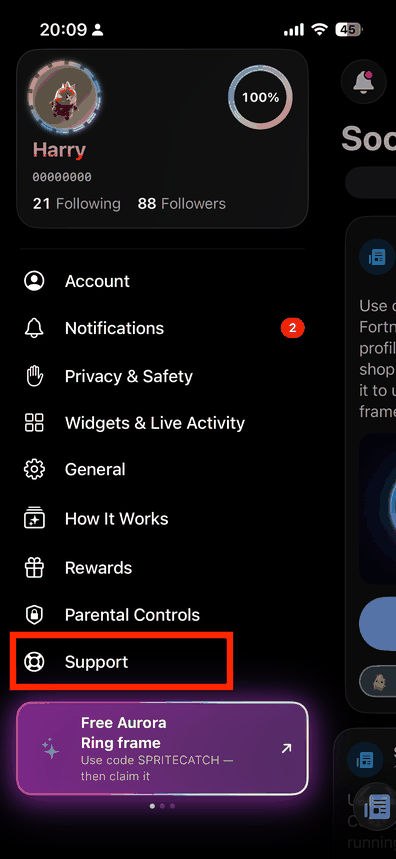
The fastest route is inside the app: open the menu and tap Support. You'll get the
reply right there, and I can see which account I'm talking to. The web version at
spritecatch.com has the same thing, under
Settings → Standing & support, and it reaches exactly the same place —
a conversation started on one shows up on the other. Email
support@spritecatch.com works too. Support is answered
by the developer, so please be patient — replies usually come within a couple of days. Reports of
abusive content are handled within 24 hours.
Think a warning on your profile is wrong? Open the menu, tap Support, and pick Appeal a warning on my profile. I read every appeal and reply either way. Appeals are paced — you can send a limited number in a set period, and the app shows a countdown to the next one — so each one gets a proper read. If you appeal, get an answer, and then send the same appeal again and again, I may stop replying for a while — that changes nothing about your account and it does not last, and a report about somebody's safety is always read whatever else is going on.
Claiming the creator code reward
If you use the Support-A-Creator code SPRITECATCH in Fortnite's Item Shop, you can claim the Aurora Ring for your profile. Using a code is free — you don't have to buy anything — and the reward is a decoration, so nothing in the app is behind it either way.
- Open the Item Shop — this link opens it with the code already attached, or open Fortnite and go there yourself.
- Scroll to the bottom and enter SPRITECATCH in the creator code box.
- Take a screenshot showing the code applied.
- Send it to me. If your app shows a Send your proof button on the reward, use that — it attaches the screenshot and tells me which reward you mean. If it doesn't, open the menu, tap Support, pick Something else, attach the screenshot and say you're claiming the creator code reward. Both land in the same place.
I check these myself, so give it a couple of days. You'll get a reply either way, and if it checks out the Aurora Ring simply turns up in the app — you'll see it the next time you open it.
Two things worth saying plainly. A screenshot of another game may show your name in that game, so send the part that shows the code and nothing more; and nothing you send goes to Epic Games — I look at the picture myself, because there is no other way to check it. Sprite Catch is an unofficial fan project and is not made by Epic Games.
Common questions
What is Sprite Catch?
A free tracker for the sprite collectibles in Fortnite Chapter 7. You mark which sprites and which styles you own, it shows you how close you are to a full set, and it helps you find other collectors who have the style you're missing. It's an unofficial fan project and it costs nothing to use. It works on an iPhone, on an Android phone, and in a browser at spritecatch.com, with the same account and the same collection on all three.
Do I need an account?
No. The app works immediately, offline, with no sign-in, and so does the collection tracker on the web. Signing in — with Apple, with Google, or with an email address and password — is optional and only exists so your collection follows you to a new device, and so the community, trading and messaging work. If you sign in later, the collection you already built as a guest is carried over, and that is true in a browser too: it offers to merge what you ticked off there into your account.
Can other people see my collection?
Yes — profiles are public by default so collectors can find each other and match trades, which is
what lets others see your display name, Fortnite tag, collection and trades. A public profile also has
a web address you can share, spritecatch.com/u/<your username>, which anyone with
the link can open without the app, and a public profile can be read in the web version by somebody who
has never signed in. Public collectors are also ranked on the leaderboard at
spritecatch.com/leaderboard. Switch your profile to
private in Settings at any time: it hides you from Discover, from trade matching, from the leaderboard
and from that web page, which then shows nothing at all.
My collection didn't sync.
Everything you tap is saved on your device first and synced afterwards, so nothing is ever lost because you were offline. If a change hasn't appeared on another device, check that both devices are signed in with the same account and connected to the internet, then reopen the app. The web version syncs the same way once you are signed in; used signed out, what you tick there stays in that browser and never reaches your account.
A sprite is missing, or its art is wrong.
The catalog updates every week as new sprites are released, so a brand-new sprite usually appears within a few days. A handful of variants have no artwork published anywhere yet, and those show a placeholder until art exists. If something is genuinely wrong, email me and I'll fix the catalog — you won't need to update the app.
How do trades work?
They don't happen in the app. Sprite Catch only introduces you to someone who has the style you want and wants a style you have. The actual trade happens between you and them inside Fortnite. Never pay real money for an item and never share your Epic credentials — see the Terms of Use.
Someone is harassing me, or posted something offensive.
Report it to support@spritecatch.com with their username or display name and a screenshot if you have one. Reports are reviewed within 24 hours, offending content is removed, and abusive accounts are removed from the service. There is no tolerance for this.
If you are having a hard time
Sprite Catch is a collection tracker. It is not a crisis service, and nobody here is watching your messages for signs that you are struggling. That is worth saying plainly, because a lot of the people using this app are young, and an app that quietly implied somebody was keeping an eye out would be doing harm rather than good.
If you are thinking about hurting yourself, or you are frightened, or something has happened to you and you do not know who to tell — please talk to someone who is trained for it. These are free, confidential, and open to you whatever country you are in:
- findahelpline.com — pick your country and it gives you the helplines there, including lines specifically for under-18s. It covers more than 130 countries and costs nothing.
- United States and Canada: call or text 988.
- United Kingdom and Ireland: call 116 123 (Samaritans), free, any time.
- Much of the European Union: 116 123 reaches an emotional support line in most member states, and 116 111 is the child helpline number.
- If you are in immediate danger, call your local emergency number.
If an adult you have met here, or anywhere online, has asked you for photos, for money, or to keep a conversation secret — that is not your fault and you are not in trouble. Tell an adult you trust, and report the account in the app. You can also report it to support@spritecatch.com and it is read within 24 hours.
You can write to support here about anything, and a person reads it. But support is one developer in one time zone, and it is not the right place for an emergency — the numbers above are answered now, and this one might not be until tomorrow.
Delete your account and data
Email support@spritecatch.com from the address associated with your Apple ID, or include your Account ID (Settings → Account). I will permanently delete your account, your collection, your trades and your friends list within 30 days, and confirm when it's done. You can also ask for a copy of your data first — see the Privacy Policy.
Contact
Mateo Duran — contact@spritecatch.com
Uruguay